How Wishlist Items and Tracking Items Work in Whisprice
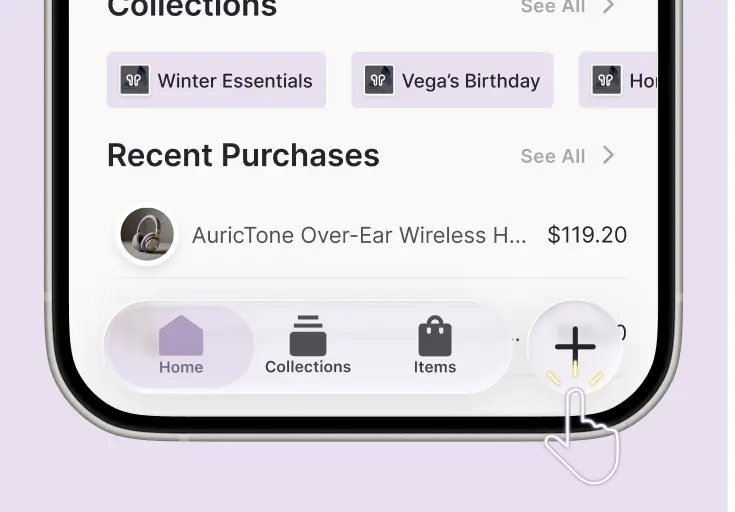
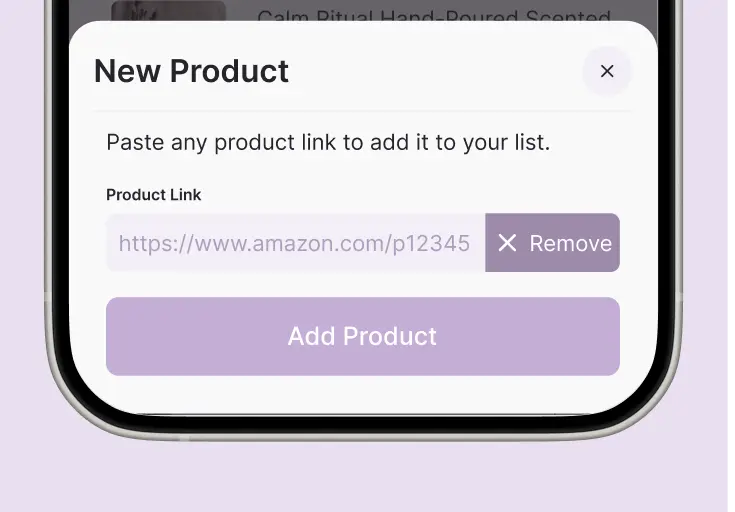
With Whisprice you can save the products you love and track the ones you want at the right price. Tracking items get automatic price drop alerts so you never overpay. Wishlist items stay quietly saved, no alerts, no pressure. Switch between the two anytime, in one tap.
The Power Inside
Two Item Types for Every Need of Your Online Shopping
Whisprice started as a price tracker. But your wishlist does not stop at the items you are actively chasing. We expanded item limits so you can save everything worth saving, tracked or not, in one place. Your full shopping universe, organized and always within reach.
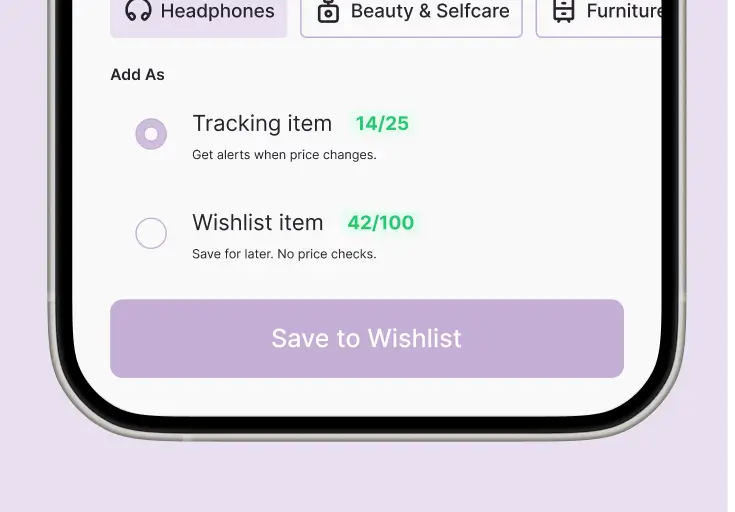
Tracking Item An active monitor for products you are ready to buy. Whisprice checks the price and stock regularly, builds a price history over time, and alerts you the moment something changes. You set the target, we do the watching.
Wishlist Item A flexible way to save products you love, with no obligation to track them. No alerts, no monitoring, just a clean and organized space to keep everything worth remembering in one place.
Why It Matters
What You Get on Each Plan
Your products are always yours. Switch plans anytime without losing a thing.
Free Plan
20 Products
5 Tracking + 15 Wishlist
Early Bird
125 Products
25 Tracking + 100 Wishlist
Keeping You in Control
Same App, Two Different Jobs
Tracking items watch prices and send alerts. Wishlist items remember products without any obligation to buy. Both belong in Whisprice, and you can switch between them anytime.
Purpose
Price drop alerts
No
Price history chart
No
Stock status updates
No
Counts toward your tracking limit
No
Counts toward your wishlist limit
Yes
Private Notes & Scores
Yes
Works on any store
Yes
Visit store with a single tap

Wishlist Item
What People Save as a Wishlist Item
Not everything you save needs a reason. Your wishlist is for the products you want to hold onto, whether or not you ever buy them.
You Want to Organize Your Shopping Universe
Not every saved product is an active mission. Your wishlist is your personal catalog, a living, evolving collection of things you love, want, or are curious about. Grouping items by category, occasion, or recipient (think: "Home Upgrade," "Gift Ideas," "Next Season") gives you a clean, clutter-free overview without overwhelming your main dashboard.

You're Tracking One Variant but Love Multiple Options
Found the perfect sneaker and tracking the black version? Save the white and navy versions to your wishlist too. If your tracked variant goes out of stock right when the price drops, or never hits your target, your backup favorites are already saved and ready to go. No scrambling, no settling.

The Price Doesn't Really Matter to You
Some products have a price you'd happily pay regardless of fluctuations. Maybe it's a specific book, a niche accessory, or a low-cost everyday item. You want to remember it, not obsess over it. A wishlist item keeps it organized and accessible without treating every $1 change as breaking news.

You're Still Deciding Between Multiple Options
Window shopping? Smart. When you're comparing three different running shoes or narrowing down laptop models, your wishlist becomes a personal research board. Save the contenders, weigh your options, and promote the winner to a tracked item once you've made up your mind.

Saving It Without the Pressure to Do Anything
If a purchase is months away, like a holiday gift you're planning ahead for or a big-ticket item you're still saving up for, there's no point in receiving price alerts today. Add it to your wishlist to keep it on your radar without the noise. When the timing is right, you can always convert it to a tracked item.

Let Someone Else Handle the Buying
Birthdays, anniversaries, wishlists shared with family. If there's a chance someone else is handling the purchase, you don't need price alerts cluttering your notifications. Save it to your wishlist as a soft "I want this," and move it to tracking only if you decide to buy it yourself.

Tracking Item
What People Track as a Tracking Item
Some products you have already decided on. You are just waiting for the price to be right. Tracking items watch the price for you and send an alert the moment something changes.
You're Ready to Buy at the Right Price
You've already decided you want it. The only question is when the price is right. This is exactly what tracking is built for. Set your target price, let Whisprice monitor it twice a day, and get notified the moment it drops. No checking, no guessing, just buying at the right moment.

The Price Fluctuates Frequently
Some products, especially electronics, appliances, and popular fashion items, change price regularly. If you've noticed a product bouncing between price points, active tracking means you'll catch the dip the moment it happens instead of stumbling on it by accident days later.

You're Watching a High-Ticket Item
The higher the price, the more a small percentage drop is worth. Tracking a $1,200 laptop means a 10% drop saves you $120, far more than the cost of a subscription. For big purchases, active monitoring is not a nice-to-have. It is the smart move.

Stock Levels Make You Nervous
If a product sells out regularly or is limited in availability, you need more than a saved link. Tracking gives you stock alerts so you can act fast when it is back, not discover it is gone again after the fact.

You Want to Verify a Sale Is Actually a Deal
A "40% off" badge means nothing without context. When you track an item, Whisprice builds its price history over time, so you can see whether that sale price is genuinely low or just a manufactured discount. Tracking turns you from a hopeful buyer into an informed one.

A Real Deadline Is Driving Your Decision
Buying a gift? Moving into a new place? Starting a new semester? When there is a real date pushing you toward a decision, passive saving is not enough. Tracking keeps you informed so you can buy with confidence before your window closes, not after.

Good to Know
Your Questions, Answered
Everything you wanted to know about Tracking items, Wishlist items, Collections, and how your plan works.
Can I move an item from Wishlist to Tracking?
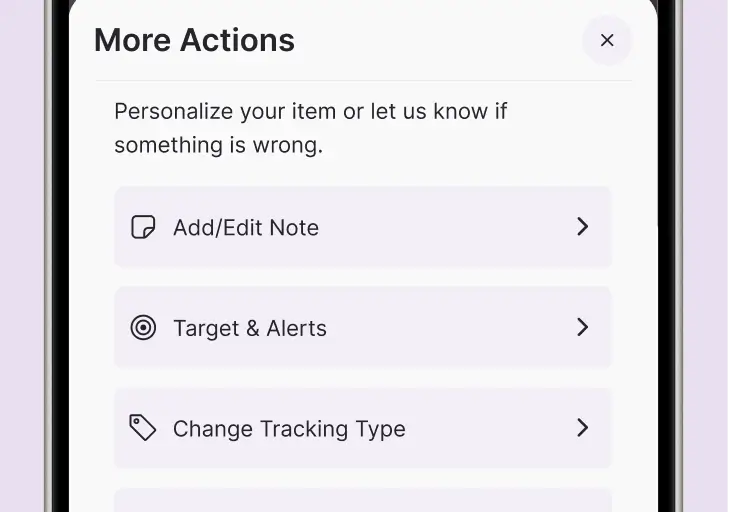
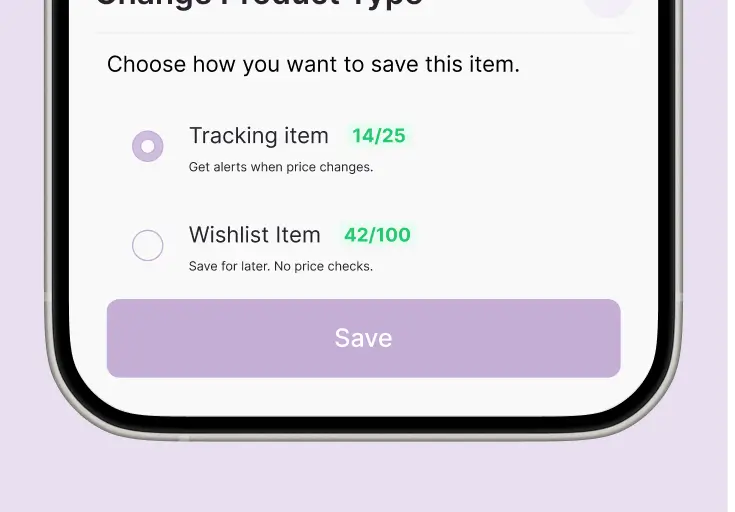
Yes. Open the product, tap the ⋯ menu, choose Change Tracking Type → Start Tracking. Alerts begin immediately.
Do Wishlist items count toward my Tracking limit?
No. Wishlist items and Tracking items have separate limits. Free users get 5 Tracking and 15 Wishlist. Paid users get 25 Tracking and 100 Wishlist.
What happens if I downgrade from Paid to Free?
Nothing is deleted. Your most recent 5 Tracking items stay; older Tracking items move to Wishlist automatically.
Can I add the same product to multiple Collections?
Yes. One product can live in many Collections and only counts once against your plan limit.
Will I get notifications for Wishlist items?
No. Wishlist items don't trigger any notifications. Switch to Tracking if you want price drop or stock alerts.
Does the Collection total price include Wishlist items?
No. Only Tracking items count toward the Collection total and the amount saved shown on each Collection card. Wishlist items are saved alongside but not counted, since their prices are not actively tracked.
Why is the price of my Wishlist item the same as when I saved it?
Wishlist items capture the price at the moment you saved them and do not update after that. To see live price changes and a full price history chart, switch the item to Tracking.
How do I filter a Collection to show only Tracking items or only Wishlist items?
Open the Collection and tap the filter icon. Choose Tracking Type and select Tracking items, Wishlist items, or All. The same filter works on your main dashboard.